Isolated workspaces
A workspace for every task.
Each task works in its own Git worktree. Independent agents can make progress at the same time.

YOUR MACHINE. YOUR WORKSPACE.
Give your ideas a plan. Let OpenCode agents work side by side. Bring it all together with a review you can trust.
macOS · Linux · Windows in preparation / Built with Bun
Less window switching.
More of the work that matters.
A PLACE FOR THE WHOLE PROCESS
Your plan, conversations, and changes belong together. Loom gives them a shared home.
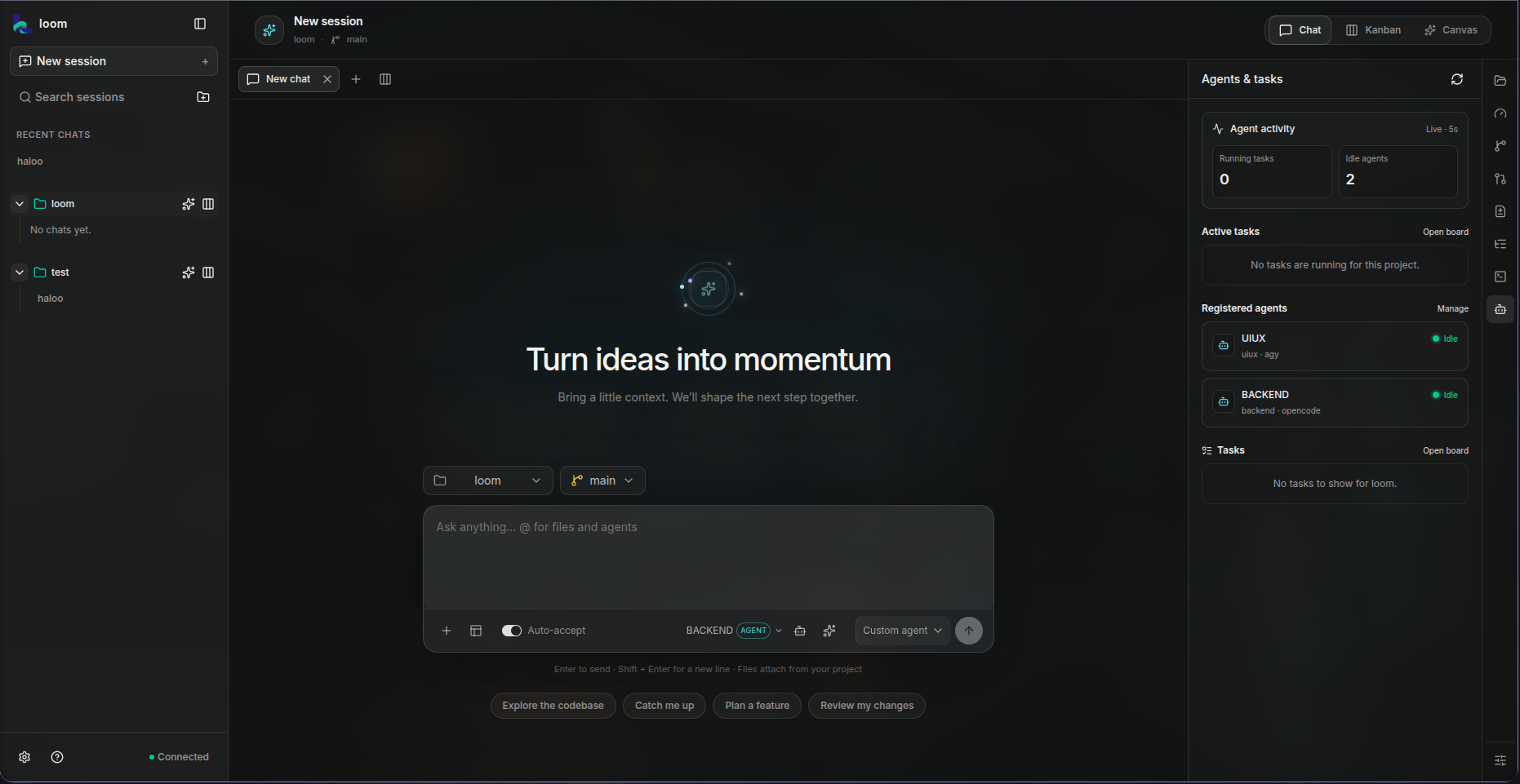
Move from an idea to a working branch without losing track of the conversation.
Captured in LoomBUILT FOR WORK THAT HAS MOVING PARTS
Isolated workspaces
Each task works in its own Git worktree. Independent agents can make progress at the same time.
Dependency-aware planning
Plans make dependencies explicit. Dependent tasks wait for the work they need and receive its context.
Integration & review
Loom brings task branches together, runs your checks, and presents a diff for approval before merging.
Multi-chat workspace
Open separate chat tabs, split the view, and keep conversations for different parts of a project easy to switch between.
Provider choice
Use OpenCode for the primary workspace flow, or route chat through a connected Claude Code, Codex CLI, or Antigravity CLI provider.
Workspace tools
Keep project files, terminal sessions, agent activity, and available context close to the conversation.
ONE IDEA. THREE DELIBERATE STEPS.
Start with a repository and a goal. Stay as involved as the work requires.
Your first projectCreate a plan. Review the proposed tasks, adjust dependencies, and approve the commands that will validate the result.
Agents work in isolated branches. Follow the Kanban board, read the chat, and respond when an agent needs permission.
Inspect the task changes and check results. Merge each task when you are happy with what you see.
LOCAL BY DEFAULT
Loom keeps project and task data locally. Messages, selected files, and tool context may be sent to the provider selected for that chat or task.
A SMALL START FOR YOUR NEXT BIG THING
Install Loom, then open it with loom. Git and OpenCode are
the prerequisites. Loom itself runs on Bun, bundled with the release.
Want the website as an app shortcut? Use your browser menu to install Loom Workspace. The shortcut opens this public site; the CLI install below sets up Loom locally.
Full installation guidecurl -fsSL https://loomworkspace.bond/install.sh | sh[1/8] Checking your systemPlatform detected: macOS/Linux · x64/arm64install target ~/.loom/bin/loomdata directory ~/.loomrelease channel stable[2/8] Checking the tools this installer needscurl or wget foundsha256sum or shasum found[3/8] Checking what Loom needs after the binary is installedgit found — worktrees and task branches are readyOpenCode found — task runtime availableThis demo is illustrative; the real checks use your device's detected state.Bun, Node.js and npm are not needed: the release bundles the Bun runtime with the UI.[4/8] Resolving the latest release on the stable channelGET .../releases/download/channel-stable/manifest.jsonStable release · platform-specific binary[5/8] Downloading the Loom binary[###########.............] Download progress is shown in your terminal[######################..] Download completes before verificationBinary downloaded to a temporary file[6/8] Verifying the downloadComparing downloaded file to the signed-off release checksumSHA-256 verified before installation[7/8] Installing LoomDownloaded executable starts successfullyInstalled to your user folder; no administrator access used[8/8] Adding Loom to your user PATHAdded Loom to your shell PATHLoom installed successfullyNext: restart your terminal, then run loomNothing is built or cloned on your machine: the installer downloads one
published binary, verifies its SHA-256, then writes it into ~/.loom. Missing tools are reported, never installed for you.
Loom uses Bun as its JavaScript runtime; the release bundles Bun, so users
do not need to install it separately. Install Git and OpenCode, then
configure an OpenCode model provider to use the workspace. The
command-line installer does not install a native desktop app; Loom opens
its local browser workspace after you run loom.
Published targets: macOS on Apple silicon and Intel, and Linux on x64 and arm64 with glibc. Windows x64 is being prepared, so the PowerShell installer reports that clearly instead of failing on a missing download.
You can also install this website from your browser menu as a shortcut. That installs the public product site, not the local Loom workspace or daemon.
Installers use published GitHub Releases. Availability and platform requirements are listed in the docs.
BEFORE YOU GET STARTED
Loom is built with Bun, and the release bundles Bun's runtime with the executable and browser UI. You do not need to install Bun, Node.js or npm separately. You will need Git and OpenCode available on your PATH for Loom's primary task workflow. For chat, you can also connect supported Claude Code, Codex CLI, or Antigravity CLI runtimes.
Yes, your browser can install or pin the public Loom product site as an app shortcut. That is only the website; the Loom workspace is installed separately on each user's device with the command-line installer and runs locally.
Yes. Add the path to a local Git repository with at least one commit. Loom creates separate worktrees for tasks. Keep your main checkout clean before approving a merge.
You choose a connected provider and model in chat. Custom agents can have their own provider and optional model. Loom's task workflow uses OpenCode; provider usage and charges follow the provider selected for each request.
The model, custom agent, and thinking mode are selected for each message. You can switch them during a conversation, so check the composer before sending if you want to keep using the same setup.
Integration happens in a separate workspace. A resolver can propose a fix, and checks run again. The combined diff still needs your approval before it reaches your project branch.